Home

Top DevOps Trends Businesses Must Embrace in 2026

Top DevOps Trends Businesses Must Embrace in 2026

Join our Newsletter!

DevOps Trends

Have you been paying attention to the speed at which DevOps trends are changing and how they are affecting businesses? If you’re managing a tech team or are just about to scale up your operations, you may already be thinking about the implications of these trends on your success. As more companies adapt to smarter workflows and quicker ways of delivering value, being up to date is critical. So, how can you stay on top of it without falling behind?

Finding the answer to this question involves understanding the trends that affect how we run businesses in the real world. DevOps best practices today are designed to bring automation, cloud-native tools, or security-first approaches to solve the problems we face in modern situations. Being aware of what’s meaningful and useful can help your team be more effective while accelerating time to market. In this blog, we will examine key trends and look at how they can create real results for your organization.

As businesses embrace DevOps in 2026, the need for expert guidance becomes crucial. At Mindpath, our DevOps services ensure organizations can adopt the right strategies and technologies to stay competitive.

Understanding DevOps: A Quick Dive-in

DevOps is a development approach in which software developers and IT teams collaborate on software and business processes. By working together, they share responsibilities and use tools to speed things up and facilitate the flow of work. DevOps is centered around good communication, collaboration, and automation. In essence, DevOps can deliver near-instant software, identify issues sooner, and get a better and quicker flow between building and deploying applications. As a result, many organizations leverage DevOps for business strategy and agility since it can enhance both speed and efficiency.

In this approach, one team often takes care of everything, including coding, testing, releasing, and maintaining the software. This removes delays and improves software quality. Teams use automation tools to speed up tasks and reduce errors. DevOps also brings security into the process right from the beginning, so it becomes part of every step. This working method helps businesses launch better software faster while keeping systems stable and secure.

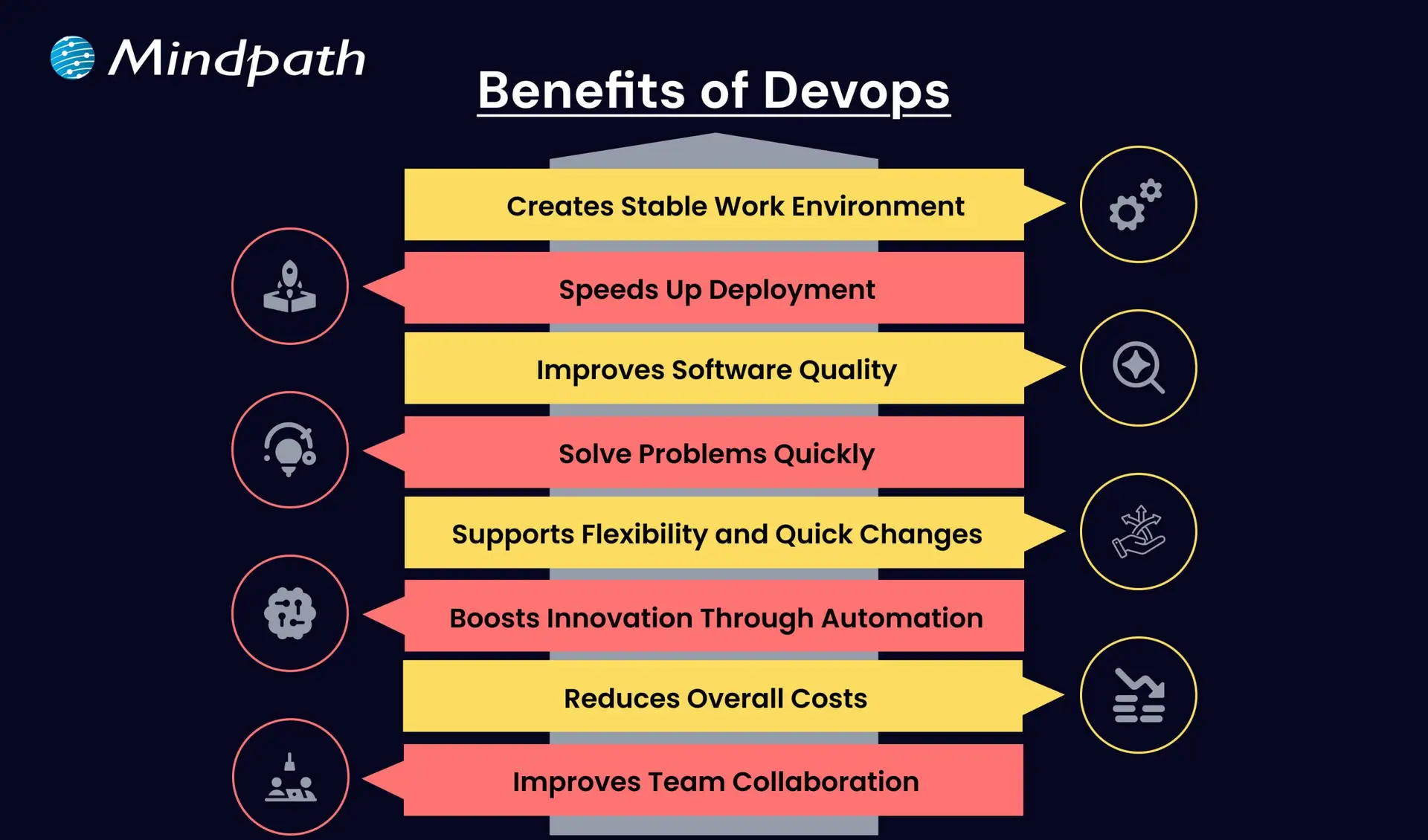
Here are some of the benefits that DevOps can offer:
Benefits of Devops

1. Creates a Stable Work Environment

DevOps helps teams handle changes easily without stress. It brings a better balance to daily work and keeps operations running smoothly.

2. Speeds Up Deployment

DevOps allows faster software releases with fewer delays. This helps businesses deliver new features quickly and stay ahead in the market.

3. Improves Software Quality

With regular testing and feedback, DevOps helps catch bugs early. Teams can focus on creating better products with fewer errors.

4. Solve Problems Quickly

DevOps uses monitoring tools to spot issues fast. Smaller and frequent updates make fixing problems easier and more reliable.

5. Supports Flexibility and Quick Changes

DevOps builds a flexible work style where teams can respond to change easily. It helps businesses adapt to market needs faster.

6. Boosts Innovation Through Automation

By reducing manual tasks, DevOps gives teams more time for new ideas. This leads to faster improvements and better products.

7. Reduces Overall Costs

DevOps combines tasks and reduces the need for rework. This saves time, uses resources better, and cuts down project costs.

8. Improves Team Collaboration

DevOps encourages better teamwork and shared goals. Clear communication between teams leads to faster decisions and stronger results.

Aiming to enhance operational efficiency and reduce development risks? Check out our blog on DevOps Challenges and Solutions to discover proven approaches that improve performance, stability, and cross-team cooperation.

Top DevOps Trends 2026

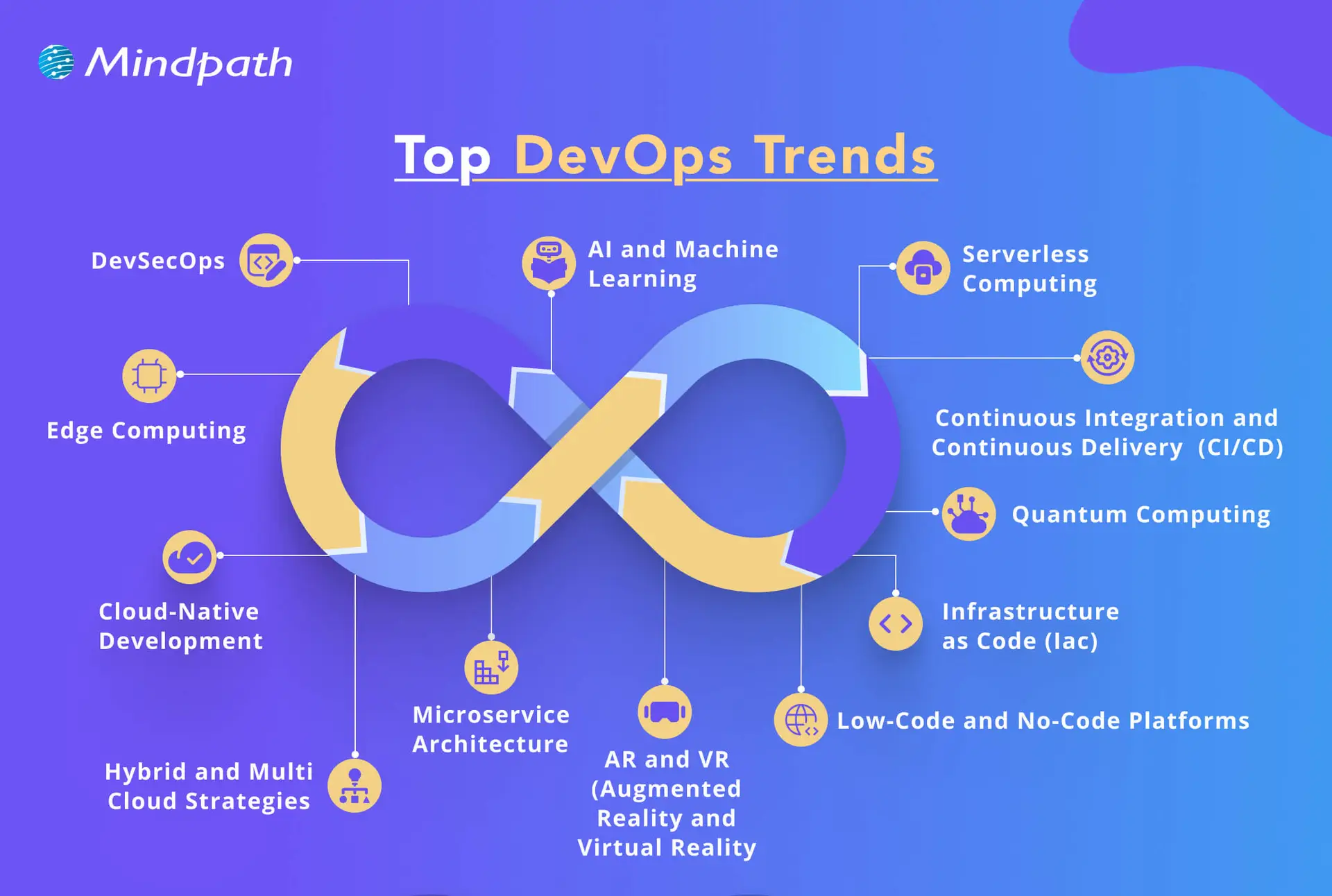
As technology continues to evolve, companies are rethinking how they build, test, and deliver software. DevOps trends for businesses in 2026 show a clear shift toward smarter tools, stronger collaboration, and faster delivery. By following the latest DevOps transformation strategies, organizations can stay ahead and build systems that are both efficient and future-ready.
top devops trends

1. DevSecOps

DevSecOps is becoming a key part of DevOps innovation, where security is built into every stage of the development process. Instead of adding security at the end, teams now include it early to catch risks before they grow. This trend helps businesses create safer applications by using automated testing and continuous monitoring within the DevOps workflow.

2. AI and Machine Learning

AI and machine learning is one of the latest DevOps trends, helping teams work faster and smarter. These technologies support intelligent monitoring, find unusual behavior in systems, and give early warnings before issues grow. By using data to guide decisions, DevOps teams can improve system performance and reduce downtime.

3. Serverless Computing

Serverless computing is becoming a popular trend in DevOps for business success because it removes the need to manage servers. It allows teams to focus only on writing code, which speeds up development and reduces overhead. This approach also helps businesses save costs by using resources only when needed, making operations more efficient.

4. Continuous Integration and Continuous Delivery (CI/CD)

Continuous Integration and Continuous Delivery (CI/CD) is a key DevOps trend that helps teams deliver software faster and with fewer errors. It allows developers to regularly merge code changes, test them automatically, and deploy updates smoothly. This approach improves software quality and supports a steady flow of new features to users.

5. Infrastructure as Code (IaC)

Infrastructure as Code is a growing trend that helps teams manage infrastructure through written code instead of manual steps. It ensures consistency across development, testing, and production, reducing errors and saving time. As one of the leading DevOps tools and technologies, it allows automated setup and easy tracking of changes in infrastructure.

6. Microservices Architecture

Microservices architecture is a DevOps approach where an application is built using many small, separate services. Each service handles a specific function and can be updated or scaled on its own without affecting the rest of the system. This makes the software more flexible, easier to manage, and better at handling changes or failures.

7. Cloud-Native Development

Cloud-native development is a modern way of building applications that fully uses the power of cloud computing. It is one of the key DevOps trends helping businesses create software that can easily grow, move, and adapt to changing needs. By using containers and microservices, teams can build flexible and efficient systems that are ready for fast updates and smooth scaling.

8. Edge Computing

Edge computing is a growing part of modern DevOps trends that focuses on processing data close to where it is created. This reduces delays and improves the speed of applications by handling data locally instead of in a central server. It also helps save bandwidth and supports real-time decision-making, making systems faster and more efficient.

9. Hybrid and Multi-Cloud Strategies

Hybrid and multi-cloud strategies are important DevOps trends that give businesses more flexibility and control over their cloud usage. By using services from different cloud providers, teams can choose the best tools and features for each task. This approach improves performance, reduces risk, and avoids being tied to one provider.

10. Low-Code and No-Code Platforms

Low-code and no-code platforms are shaping the future of DevOps by making application development easier and faster. These tools allow non-developers to build and launch apps with simple interfaces, helping teams save time. By handling basic tasks through these platforms, developers can focus on more complex work and boost overall productivity.

11. Quantum Computing

Quantum computing is an emerging part of DevOps trends with the potential to solve complex problems much faster than traditional systems. Although still in the early stages, it may one day help teams handle advanced computing tasks more efficiently. As the technology grows, it could bring powerful new capabilities to DevOps in areas like testing, simulation, and optimization.

12. AR and VR (Augmented Reality and Virtual Reality)

Augmented Reality and Virtual Reality are becoming new DevOps trends that support better training, simulation, and team collaboration. These technologies create realistic, hands-on experiences that help teams learn and solve problems more effectively. AR and VR also improve remote teamwork by making interactions more engaging and productive.

Looking to combine fast DevOps practices with automated security checks? Check out our blog on DevOps vs DevSecOps to understand how DevSecOps adds proactive, automated safeguards to every stage of your pipeline.

Is Your Business Ready to Benefit from the Latest DevOps Trends?

DevOps trends continue to shape how businesses grow through faster delivery, better collaboration, and smarter tools. Staying updated helps teams move quickly, improve software quality, and remain competitive in a rapidly changing market. By understanding and applying these trends, companies can build stronger systems and create real value with every software release.

At Mindpath, we offer expert DevOps services that help businesses streamline processes, boost collaboration, and deliver software faster. Our team uses modern tools and proven strategies to support automation, cloud-native development, and continuous delivery. Contact us and we’ll guide you through each stage with clear planning, smooth implementation, and reliable support tailored to your business goals.

Frequently Asked Questions

1. How do DevOps trends in 2026 actually affect day-to-day development team operations?

DevOps trends in 2026 are directly changing how teams plan, build, and ship software daily. Automation reduces manual work, AI flags issues earlier, and cloud-native tools speed up deployments. Teams that adopt these shifts experience fewer bottlenecks, faster releases, and significantly better collaboration across development and operations functions.

2. Is DevOps only relevant for large enterprises or can smaller businesses benefit too?

DevOps works exceptionally well for businesses of all sizes. Smaller teams actually benefit faster because there is less organizational resistance to change. Adopting automation, CI/CD pipelines, and cloud tools helps small businesses compete with larger players by delivering software faster and maintaining higher quality with leaner resources.

3. How long does it typically take a business to see results after adopting DevOps practices?

Most businesses notice improvements in deployment frequency and team collaboration within three to six months. Deeper results like reduced downtime and better software quality take longer to measure accurately. The speed of results depends heavily on team readiness, tooling choices, and how consistently DevOps practices are applied across workflows.

4. What is the biggest challenge businesses face when shifting to a DevOps culture?

The biggest challenge is rarely technical. It is cultural. Getting development and operations teams to share responsibilities, communicate openly, and trust automated processes takes time and strong leadership. Many organizations underestimate this human side of DevOps adoption and focus too heavily on tools while neglecting team alignment and mindset shifts.

5. How does DevSecOps differ from traditional security practices in software development?

Traditional security is applied after development is complete, which creates costly delays and vulnerabilities. DevSecOps integrates security checks at every stage of the pipeline from day one. This proactive approach catches risks earlier, reduces remediation costs, and ensures that security never becomes a bottleneck slowing down release cycles.

Support Is One Click Away

Featured Posts

Related Post

Cloud Disaster Recovery

Have you ever wondered what would happen to your business if a disaster struck and you lost access to critical data or systems? Whether it’s a hardware failure, cyberattack, or even a natural disaster, the impact can be devastating. But what if there was a way to ensure that your business could quickly recover and keep running smoothly? That’s where Cloud Disaster Recovery comes in. In this blog, we will explore how this powerful solution can safeguard your data and help your business bounce back faster than ever. Let’s dive in!

What is Cloud Disaster Recovery?

Cloud Disaster Recovery (Cloud DR) is a dependable method for organizations to backup and recover essential data and systems in the event of an unforeseen catastrophe. It entails keeping copies of apps, information, and resources in a secure cloud setting. When disaster strikes, such as a hardware breakdown or a cyberattack, organizations can swiftly recover their data and restart operations. Cloud DR also includes capabilities like automation, which make the recovery process faster and more efficient. It is adaptable, letting businesses scale their storage and recovery requirements as they develop, assuring ongoing protection and minimal downtime.

Why is Cloud Disaster Recovery Important?

Cloud Disaster Recovery is vital because it enables organizations to remain safe and recover rapidly when unforeseen difficulties arise, such as system outages, cyberattacks, or natural catastrophes. Losing data or access to vital systems can result in delays, financial losses, and reputational damage. Businesses can use Cloud DR to swiftly recover their data and resume operations without taking extensive interruptions. It guarantees that essential information is always secure and ready for use. It also saves time and money by automating the recovery process and offering a flexible option to scale with the company’s demands. This makes it a wise and dependable option for being prepared.

Advantages of Cloud Disaster Recovery

1. Flexible Scaling

Traditional disaster recovery systems frequently rely on physical data centers, which can be expensive and limited in flexibility. Businesses must purchase servers, storage devices, and networking equipment while also maintaining the complete system for recovery operations. This method not only requires a significant initial expenditure, but it also fails to respond rapidly to changing needs. Cloud Disaster Recovery addresses this issue by providing flexible and scalable solutions. Businesses can employ resources on demand through services such as public cloud alternatives or Disaster Recovery as a Service (DRaaS). This means customers can adjust the capacity they require, like storage or processing power, immediately through user-friendly websites. This strategy saves money by removing the need for costly physical infrastructure and maintenance. It also enables organizations to adapt rapidly to expansion or unanticipated events, ensuring that they have the necessary resources when they need them. Businesses who migrate to cloud disaster recovery benefit from a cost-effective and adaptive solution to preserve their data and systems while focusing on their core activities.

2. Fast Recovery

Cloud-based disaster recovery guarantees faster and easier recovery operations, allowing organizations to minimize downtime. One of the primary benefits is the usage of virtual machines (VMs), which allow you to verify workload availability without impacting everyday operations. This allows firms to routinely review their recovery plans and ensure they are prepared to respond in the event of an emergency. The cloud also provides high-speed bandwidth and enhanced disc performance that can be customized to meet certain recovery time objectives (RTOs). These customizable solutions let firms recover vital systems and data more effectively. Unlike traditional techniques, which rely on physical resources, cloud services allow faster access to the tools and backups required for recovery. Cloud disaster recovery minimizes the time required to restart regular operations after an interruption by combining simplicity of testing, customizable choices, and quicker data retrieval. This guarantees that firms remain robust, retain loyal customers, and reduce financial and operational losses.

3. No Location Limits

Cloud Disaster Recovery (Cloud DR) has the benefit of being independent of a specific physical location. Unlike traditional disaster recovery solutions, which rely on local or remote data centers, Cloud DR enables enterprises to store backups in data centers located anywhere in the world. This avoids the possibility of losing access to important data and systems if a calamity strikes the principal site of the organization’s equipment. Businesses can utilize Cloud DR to pick backup facilities in various geographic areas, ensuring that their data is secured from local threats such as floods, fires, and power outages. This flexibility enables businesses to develop a disaster recovery strategy that meets their specific demands while avoiding any disruptions caused by physical location limits. Additionally, the cloud’s global reach enables organizations to expand and modify their recovery solutions to individual requirements, without being constrained by on-premises equipment. This gives greater protection and business continuity, regardless of where the calamity occurs.

4. Geo-Redundant Backup

Geo-redundancy in cloud disaster recovery improves data security and availability by utilizing a cloud provider’s worldwide network of data centers. These data centers are dispersed across numerous areas, allowing firms to store disaster recovery resources in various places. This regional spread serves as a safety net against local calamities such as earthquakes, floods, and power outages that can affect a particular region. Businesses that deploy disaster recovery resources in several areas can ensure that if one data center fails, backup systems in other places will continue to function. This not only improves the dependability of disaster recovery plans, but it also minimizes the likelihood of downtime and data loss. Geo-redundancy also offers shorter recovery times by allowing firms to retrieve their data from neighboring regions if one location faces issues. This worldwide approach to data security is especially useful for enterprises that operate in numerous locations, as it provides a resilient and scalable solution for protecting essential data and maintaining uninterrupted operations in the face of regional interruptions.

5. Usage-Based Pricing

The cloud disaster recovery pay-as-you-go model gives companies a cost-effective method to set up recovery facilities without having to pay large upfront fees. Unlike traditional managed co-location providers, which sometimes demand long-term contracts, cloud services allow businesses to pay only for the resources they utilize. This means that organizations might avoid making large initial expenditures and instead see catastrophe recovery costs as continuous, flexible expenses. With this strategy, corporations can adjust their payments depending on their real needs, adding or subtracting resources as needed. This allows organizations to grow their disaster recovery solutions without worrying about paying for wasted capacity. Pay-per-use alternatives assist firms in maintaining a cost-effective and adaptive data security strategy by converting substantial capital expenditures into affordable operational costs.

Also Read: Cloud Computing Attacks: A Comprehensive Guide for Prevention

Cloud Computing Services at Mindpath

Mindpath provides flexible and dependable cloud computing services to match your company requirements. Our cloud solutions provide safe data storage and access from anywhere. We have you covered for disaster recovery, data storage, and scalable computing power. Our pay-as-you-go strategy allows you to pay for just the resources you use, making it both cost-effective and flexible. This allows you to scale up or down as needed, without incurring significant upfront expenditures. Our cloud services are supported by a worldwide network of data centers, which guarantees excellent availability and security. Fast recovery options allow you to swiftly get back on track if something goes wrong.

Final Note!

Cloud Disaster Recovery is a crucial option for organizations seeking to secure data and reduce downtime in the event of unforeseen interruptions. Businesses can safeguard their operations while controlling costs by utilizing flexible scalability, rapid recovery, geo-redundancy, and usage-based pricing. The cloud provides unrivalled flexibility, speed, and global reach, making it the best option for modern disaster recovery. Mindpath offers dependable and scalable cloud computing services to help you stay safe, adaptive, and prepared for any emergency. With our pay-as-you-go strategy, you can focus on your core business while we handle catastrophe recovery, ensuring that your data and systems are always secure and accessible.

Ready to protect your business with reliable cloud solutions?
Partner with Mindpath today and discover how our flexible, cost-effective cloud computing services can keep you secure and run smoothly.

Contact Us!

Learn how Cloud Disaster Recovery safeguards your business with flexible, cost-effective solutions for fast recovery and data protection.
ai app development playbook

Have you ever wondered how AI app development can take a basic idea and create something that is smart, user-friendly, and helpful? Imagine an app that learns, impacts your activities, and improves your life without cognitive load! By developing an appropriate strategy, businesses can build apps that make a difference. A well-thought-out strategy will position you to create something that adds real value to users every day.

That’s why an AI app development playbook is necessary. A good playbook maps out the process into actionable steps, so it doesn’t feel overwhelming. A playbook will guide you through the process of validating your idea, selecting the right tools, developing your app, testing it, and launching it. The playbook provides a roadmap to work from, which can save time, reduce risk, and set you apart from the competition. In this blog, you will learn more about how this playbook can help you succeed. So let’s dive in!

Looking for a way to adopt an AI-powered application? Our AI development services help businesses and teams to build intelligent apps that are secure, scalable, and relevant to the needs of the user.

What Does AI App Development Mean?

AI app development is the process of building software applications that integrate artificial intelligence to perform tasks that typically require human intelligence. Unlike traditional apps that follow fixed, pre-written rules, AI-powered applications use machine learning, data pipelines, and intelligent models to learn, adapt, and make decisions in real time. This includes understanding human language, recognizing images, making recommendations, or learning users’ preferences over time. By relying on sophisticated algorithms, machine learning models, and large data samples, developers can build applications that keep improving and deliver more relevant, valuable experiences the longer they’re used.

In contrast to traditional app development, which has fixed rules and stagnant workflows, AI app development allows apps to update, evolve, and respond in real time. AI development uses data processing, pattern recognition, and predictions to be presented in a flexible state and to solve more complex problems. With the right strategy, app development with AI can equip businesses with solutions that differentiate them from competitors and adapt to new user demands.

What is an AI App Development Playbook?

An AI app development playbook is a structured guide that helps teams and businesses create applications powered by artificial intelligence. It brings together proven methods, industry best practices, and practical tips to manage the unique challenges of building AI solutions.

Instead of approaching development without direction, a playbook provides clarity and keeps everyone aligned with the same vision and goals. It helps you make better decisions, avoid common mistakes, and use resources more effectively. Having an AI app development playbook means you have a clear plan to turn an innovative idea into an intelligent, successful application.

Looking to leverage artificial intelligence to make your mobile apps smarter and more user-friendly? Discover how AI in mobile apps can enhance functionality, personalization, and overall user experience.

Benefits of Building AI App Development Playbook

A well-crafted playbook does more than just outline steps; it brings clarity to every decision you make during AI app development. It helps you build with confidence and turn innovative ideas into real, valuable solutions. Let’s dive into some of its benefits:

Benefits of Building AI App Development Playbook

1. Faster Development and Better Efficiency

A well-structured playbook helps teams work smarter and avoid wastage of time. By following proven steps and using the right AI development tools, you can speed up tasks like coding and testing. This leads to faster delivery and more efficient use of resources.

2. Enhanced User Experience

A clear plan helps you build apps that feel more personal and easier to use. Smart features like chatbots and recommendations keep users engaged and satisfied. With the right approach, your app becomes something people enjoy using every day.

3. Smarter Decisions and More Innovation

A playbook supports better choices by using data and clear workflows. Teams can experiment and improve quickly, turning ideas into working features faster. This creates an environment where new ideas thrive.

4. Higher Quality and Fewer Mistakes

When you follow a playbook, your team knows when and how to test and debug. This helps catch issues early and maintain a higher standard. In the end, users get a stable app that works as expected.

5. Responsible and Safe AI Development

A strong guide ensures your team builds solutions that are fair, secure, and trustworthy. It helps address risks like bias or privacy concerns early on. This makes your AI software development more reliable and compliant with industry rules.

6. Clear Goals and Long-Term Growth

A playbook aligns your team with clear objectives that support your business goals. It helps you plan where AI fits best, including when to add features like AI chatbot development services that bring real value. This approach keeps you competitive and ready for steady growth.

Want to enhance user engagement and automate interactions in your AI applications? Discover how lead generation chatbot strategies can streamline customer interactions and boost conversions.

Steps to Build an AI App Development Playbook

Creating an AI app development Playbook gives your team a clear roadmap to build smarter, more reliable applications. It helps you plan each stage carefully, avoid common mistakes, and deliver real value to users. Use these practical steps to shape a playbook that keeps your AI projects focused and successful.

Steps to Build an AI App Development Playbook

1. Set a Clear Vision

Begin by defining exactly what your AI app should achieve and why it matters. Know the specific problem you’re solving and the audience it will help. Make sure your vision is realistic and tied to your broader business goals. A clear vision gives your team direction and purpose. It sets the tone for every decision you make during development.

2. Do Your Research

Spend time understanding your market, target users, and any competitors. Identify the data you’ll need and check if you can access it responsibly. Look into what AI features will add the most real value. Planning for data privacy and quality early helps you avoid problems later. Good research lays the groundwork for a stronger build.

3. Build a Strong Team

Bring together people with the right mix of skills in AI, design, development, and testing. Make sure everyone understands their role and how they’ll work together. Clear communication and teamwork keep the project on track. A well-prepared team can solve challenges faster. This creates a smoother workflow and better results.

4. Pick the Right Tools

Choose AI development tools, frameworks, and cloud platforms that fit your app’s goals and budget. Look for trusted solutions that make it easier to train, test, and update your AI models. Make sure your tech stack supports scaling as your app grows. Keep your tools flexible so you can adapt to new trends and needs. The right setup saves you time and keeps development efficient.

Want to stay ahead in the rapidly evolving world of artificial intelligence? Discover the latest AI trends that are shaping applications, development, and business strategies for the future.

5. Design for Real Users

Think about how people will actually use your app in daily life. Keep the design simple, clear, and focused on solving user problems. Test early designs with real users to spot areas that need improvement. A smooth experience builds trust in your AI features. The best AI apps feel helpful and natural, not confusing or intrusive.

6. Build, Train, and Test

Start with a minimum viable product that gets the basics right. Train your AI models using clean, reliable data to get accurate results. Test often to catch problems early, rather than fixing big issues later. Use real user feedback to improve your app’s performance. A strong cycle of training and testing keeps your app working well over time

7. Keep It Safe and Fair

Map out how you will securely and responsibly handle user data. You should address any possible biases in your AI models to ensure your app is fair to all users. Stay on top of current data protection practices and regulations. Establish guidelines for your team to follow for every engagement. Following these steps will help you establish trust and remain ethical with your AI solutions.

8. Launch and Improve

Prepare to launch by testing your app in a real-world environment. Observe the ways your app works and the way users will interact with it. Explore what aspects work well and what aspects need improvement. Record these notations for use very soon after launch. Consistent updates allow you to keep your AI app up to date and trustworthy.

9. Update Your Playbook Regularly

Treat your playbook as a living document that grows with every project. After each launch, review what went well and what you could do better. Add lessons learned, updated tools, and new best practices. This keeps your team ready for future AI projects. A well-maintained playbook is an investment in long-term success.

Looking to ensure that your AI applications are secure and reliable for users? Discover essential strategies for protecting your apps by exploring web application security guide.

Want to Turn Your Smart Ideas into a Powerful AI App?

Creating an AI app development playbook helps you move an idea forward with structure, focus, and confidence. It guides your team through clear steps that save time, reduce mistakes, and make the most of available resources. With a practical playbook, you can deliver apps that adapt, solve real problems, and keep users engaged. It’s the smartest way to stand out.

Mindpath is a renowned AI development company that helps businesses build solutions that work in the real world. Our AI development services cover everything you need to plan, develop, test, and grow your app responsibly. We bring trusted strategies and proven tools to your project. Let’s work together to turn your AI app vision into a successful story.

Frequently Asked Questions

AI Tech Stack Guide

A solid and consistent AI tech stack is crucial to building powerful AI applications that actually operate. It merges the right data tools, machine learning frameworks, cloud environments, and deployment platforms to ensure your app absorbs data, learns from it, and improves over time. Smart decisions made at each layer will create a smoother development cycle, giving you a more powerful and scalable final product.

Every component of an AI tech stack combines to enable your application to be precise, quick, and able to handle real-world obstacles. Understanding how each piece is put together will enable you to sidestep potential obstacles and build smarter solutions. In this blog, you will see how to combine all of these pieces to build AI-powered applications that pass the real-world test.

Want to enhance your product with intelligent features? From recommendation engines to predictive analytics, Mindpath’s AI development services bring advanced capabilities to your applications.

What is a Tech Stack?

A tech stack is the group of tools and technologies used to build and run a software application. It includes everything from the AI programming languages and frameworks to the databases, servers, and APIs that help different parts work together. Every choice you make for your tech stack shapes how your product works, how easily it can grow, and what skills your team will need to keep it running smoothly.

A good tech stack also makes it easier to track how people use your product and see where you can improve. For any company building software, investing in the right tech stack is an important step. It gives your team what they need to create, maintain, and improve your product, so it keeps meeting customer needs as you grow.

What Does AI Tech Stack Mean?

An AI tech stack encompasses all of the required tools, frameworks, libraries, and systems for the full development, deployment, and management of an AI-powered application. It covers the whole journey of an AI application from when you find and clean data, to training your model, to getting it in action. Whether it is a chatbot, image analysis, or a predictor, the right tech stack will seamlessly work in the background to optimize the performance of your solution while it learns.

Finding the right combination of tools can keep your team organized and the project prepared to scale. Having a clear tech stack allows you to spend less time fixing a glitch and more time creating a smart feature that provides value. Preparing a clear tech stack can also provide you with a solid foundation to better manage more users, test new ideas and iterate on the AI solution, while adapting to the changing requirements of the technology.

Looking to align your AI tech stack with the most impactful advancements in the industry? Discover the top AI trends shaping the next generation of intelligent solutions.

Types of AI Tech Stack

There are different types of Artificial Intelligence tech stacks, each designed to handle specific tasks and goals. Understanding these categories helps you choose the right tools for your project’s needs.

Types of AI Tech Stack

1. Generative AI

The GenAI tech stack provides the means to build intelligent systems that can produce new products like text, images, or audio. It blends together the powerful models available, the right data, and the handiest tools to streamline and improve development.

2. Domain-Specific AI

Some sectors require targeted stacks to accommodate specialized needs and regulations, such as healthcare, finance, and retail, that engage with trusted AI outcomes.

3. Enterprise AI

This works with large organizations and allows them to develop their own AI capabilities with respect to their internal processes and suitability for their growth. It integrates bespoke development, optimal operations, and seamless integration, providing an organized approach to their more complex requirements.

4. Consumer AI

It focuses on delivering users top-level, helpful, simple, and fast AI experiences they can engage with every day. Consumer AI taps into models, smart apps, and solid cloud or edge connections to produce a seamless experience for users.

Curious about where AI is headed? Head to our blog The Future of AI: How AI is Transforming the World to learn more!

Layers of an AI Tech Stack

Building an effective AI system means understanding how each layer supports the next. These layers work together to turn raw data into smart, reliable applications.

layer of an AI tech stack

1. Infrastructure Layer

This layer forms the base of a modern AI stack, giving you the hardware and software needed to build and run AI systems. It covers everything from powerful processors to storage and operating systems that keep everything running smoothly. Without a strong foundation here, AI development would be slow and unreliable.

2. Data Layer

Good data is the heart of AI application development. This layer handles how data is collected, stored, cleaned, and prepared for use. Clean, well-organized data helps models learn accurately and perform better.

3. Model Layer

This layer is where you build and train the brains of your AI. It includes frameworks and tools that make it easier to design, test, and deploy models. A well-managed model layer speeds up AI app development and boosts results.

4. Application Layer

Here, all your hard work connects directly with users. This AI tech stack layer includes the user interface, APIs, and logic that bring your AI features to life. A clear application layer ensures people get real value from your AI.

5. Observability and Governance Layers

These layers help you keep an eye on how well your AI works and that it stays secure and fair. They cover monitoring, performance checks, and rules for data protection. Together, they build trust and long-term success.

6. Orchestration Layer

This part keeps every piece of your AI system working together smoothly. It manages workflows and automates tasks to save time. Proper orchestration means you spend less effort fixing things and more time improving them.

7. Generative Model Layer

This layer focuses on models that can create new content like text or images. It uses strong foundation models and customizes them for what your project needs. A good setup here drives innovation for creative AI solutions.

Struggling to choose the right AI model to power your AI-driven application? Explore our detailed guide on the top AI models to understand their capabilities, strengths, and real-world applications

Best Practices for Building an AI Technology Stack

Building an effective AI tech stack takes careful planning and the right approach for your goals. Following best practices helps you make smart choices and get the most out of your AI development tools and resources.

1. Define Your AI Goals Clearly

Start by knowing exactly what you want your AI tech stack to do. Clear goals help you choose the right tools and avoid wasting time on things you don’t need. It could be improving customer service, automating tasks, or predicting trends. When everyone understands the goal, the project runs smoother and stays focused.

2. Prioritize Good Data Early

Good AI starts with good data that’s clean, organized, and reliable. Make sure you have a strong system to collect and manage your data from day one. Accurate data helps your models learn better and make smarter decisions. Invest time in setting up clear data processes to get the best results.

3. Keep It Flexible and Automated

A flexible setup makes it easier to update or add new tools as your needs change. Modular systems let you swap parts without starting over, saving time and money. Use automation to handle boring, repetitive tasks, so your team can focus on important work. This approach helps you scale and stay ready for growth.

Wondering which generative AI tools are transforming modern AI application development? Learn more about the top GenAI tools for the future of AI development to strengthen your AI tech stack.

4. Ensure Security and Teamwork 

Keeping your AI secure should always be a top priority, especially when handling private data. Follow all rules and regulations to stay compliant and avoid risks. Make sure your team works well together by setting clear roles and sharing information. Strong teamwork and security build trust in your AI system.

5. Keep Improving Your Models

Your AI models should never stand still. Create a process to check how they perform and update them with fresh data. This helps your system stay smart and relevant as things change. Regular updates mean better results and a competitive edge.

6. Plan for Easy Growth

Think ahead so your system can handle more users, bigger data, and new features as you grow. A scalable setup saves you from costly rebuilds later. Make sure your tools and infrastructure can expand without any problems. This way, your AI stays strong no matter how much your business grows.

Not sure how to strategically implement AI beyond just the technical stack? Explore our detailed guide on AI in business strategy to understand how to turn AI capabilities into measurable business value.

Looking to Power Your Business with Smart AI Tech Stack?

A clear and well-structured AI tech stack makes it easier to turn complex ideas into reliable AI applications. By choosing the right tools and following smart practices, you can handle data better, keep your systems secure, and scale with confidence. A good foundation now means your solutions will adapt smoothly as your needs and goals grow.

At Mindpath, we offer trusted AI development services to help you build and maintain AI solutions that work in real business scenarios. Our team combines the best tools and strategies to design applications that learn, perform, and deliver results. Let us help you leverage AI to achieve your goals and maximize the value of your investment.